How medication tracking works
Transplant Log helps you keep track of two types of medication:
- Scheduled medications — the ones you take at regular times each day, like Tacrolimus or Mycophenolate
- As-needed medications — the ones you only take when you need them, like paracetamol
To see your medications, go to the Overview tab and tap Medication at the top of the screen (next to "Overview").
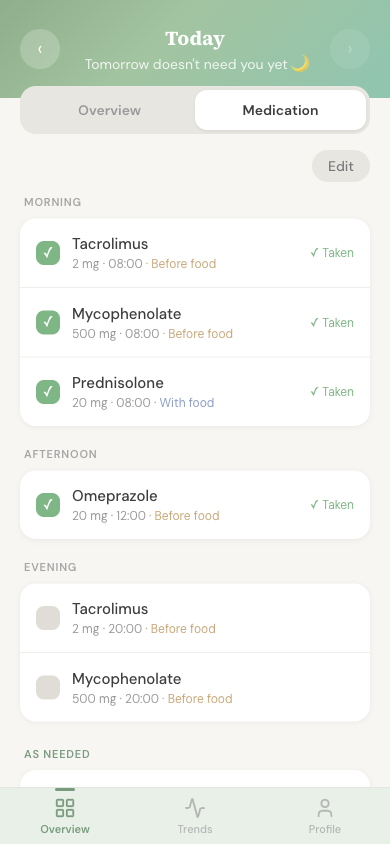
Scheduled medications
Your scheduled medications are organised by the time of day you take them: morning, afternoon, evening, and bedtime.
Transplant Log comes with some common transplant medications already set up. You can change these, remove ones you don't take, or add your own.
Marking a dose as taken
- 1 Find the medication in the list
- 2 Tap on it to mark it as taken
- 3 If you didn't take it, you can mark it as skipped instead
Editing your medications
To change your medication list, tap the Edit button at the top of the Medication screen. From here you can:
- Change the name, dose, or time of day
- Set whether it should be taken before or with food
- Stop a medication you no longer take (you can restart it later if needed)
- Add a new medication
As-needed medications
Below your scheduled medications, you'll find a section for as-needed (sometimes called "PRN") medicines. These are things you take only when needed, like pain relief.
To log a dose:
- 1 Tap Add next to the medication
- 2 Enter the dose and add any notes
- 3 The time is recorded automatically
You can also create new as-needed medications if something isn't on the list yet.
Clinic day reminder
If you have a clinic appointment scheduled and you take Tacrolimus, you'll see a helpful reminder on clinic day:
Clinic day — hold Tacrolimus
Don't take your Tacrolimus before your appointment. Bring it with you and take it after your blood test.
This is because your team usually needs to check your Tacrolimus level before you take your morning dose. Always follow your own team's instructions.