What you can track
Each day, you can record as much or as little as you like. You don't need to fill in everything — just log what feels useful to you. Your daily log includes:
Vitals
Temperature, blood pressure, heart rate, weight
Pain
Pain level, where it hurts, and notes
Activity
Walks and how long they were
Sleep
Hours slept and how well you slept
Appetite
Whether your appetite was good or poor
Mood
How you're feeling emotionally
Bowel Movements
Simple yes or no with optional notes
Symptoms
Tick any symptoms like nausea, fever, or swelling
How to log something
Logging is designed to be quick and easy:
- 1 On the main screen, tap the tile for what you want to log (for example, "Vitals" or "Mood")
- 2 A panel will slide up from the bottom of the screen
- 3 Fill in what you'd like to record
- 4 Your entry is saved automatically — just close the panel when you're done
You'll see a small confirmation message at the bottom of the screen when your entry is saved.
Your daily overview
The main screen shows all your tiles for today. Each tile gives you a quick snapshot:
- Tiles you haven't filled in yet will show a gentle placeholder
- Once you've logged something, the tile updates to show your latest entry
- You can tap any tile again to update or add to it
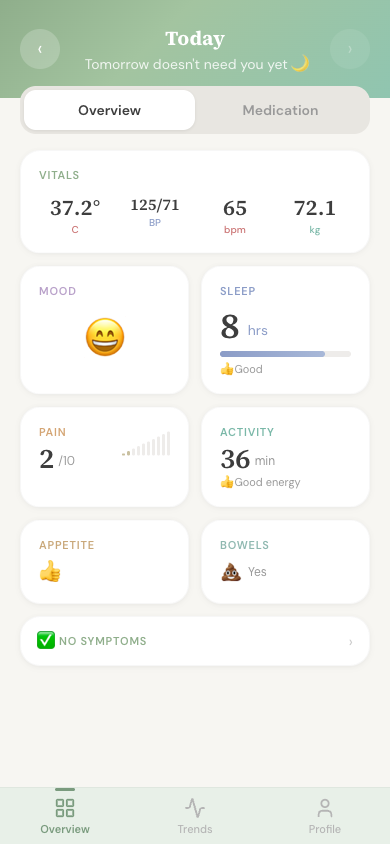
A closer look at each section
Vitals
Record your temperature, blood pressure (top and bottom numbers), heart rate, and weight. You don't need to fill in all of them — just log what you measure.
If your transplant team has given you a thermometer or blood pressure monitor, this is a good place to note down your readings each day.
Pain
You can log more than one pain entry per day. For each one, you can note how bad it is (on a scale of 0 to 10), where the pain is, and add any extra details. Each entry is timestamped so you can see when it happened.
Activity
Track your walks — you can add more than one per day. For each walk, you can record how many minutes it lasted. There's also a simple thumbs up or down to note your energy level, plus space for any notes.
Sleep
Record how many hours you slept and whether it was a good or poor night. You can also add notes — for example, if you woke up several times or had trouble getting to sleep.
Appetite
A quick thumbs up or thumbs down to note whether your appetite was good or poor today. You can add a note if you want to explain more.
Mood
Pick a face that matches how you're feeling — from very sad to very happy. There are five options to choose from, and you can add a note if you'd like. Your mood is shown on your trends so you can see how it changes over time.
Bowel Movements
A simple tick to note whether you had a bowel movement today, with space for any extra notes. Your transplant team may ask about this, so it can be helpful to have a record.
Symptoms
A checklist of common post-transplant symptoms to keep an eye on. You can tick any that apply:
If any of these are new or getting worse, contact your transplant team as they may want to know straight away.
Looking at previous days
At the top of the daily log, you'll see today's date with arrows on either side. Tap the left arrow to go back a day, or the right arrow to go forward. This lets you:
- Look back at what you logged on previous days
- Fill in yesterday's log if you forgot
- Update or add to an earlier entry
Take it at your own pace
There's no pressure to log every single thing every day. Even recording one or two things can be really helpful over time. You might find it easiest to start with mood and how you slept, and add more when you're ready.