Keeping track of your appointments
After a transplant, you'll have regular clinic visits. Transplant Log helps you keep track of them, prepare questions in advance, and write down anything important during the appointment.
To find your appointments, go to the Profile tab and tap Clinic Appointments.
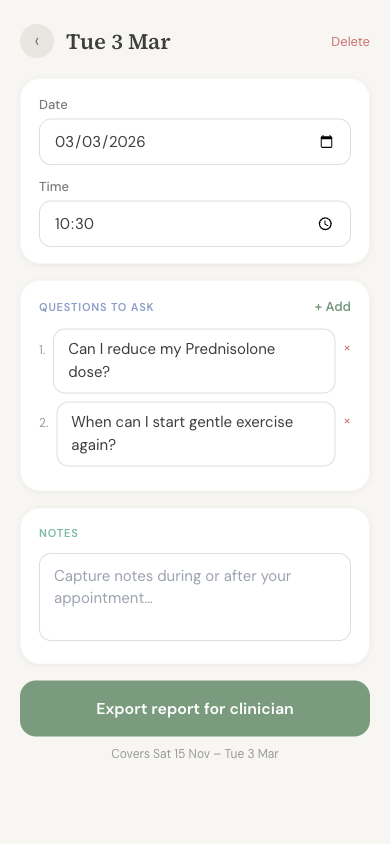
Adding an appointment
- 1 Go to Clinic Appointments from your Profile
- 2 Tap the button to add a new appointment
- 3 Enter the date and time of your visit
- 4 Everything saves automatically as you type
Preparing questions
It's easy to forget what you wanted to ask once you're in the appointment. Transplant Log lets you note down your questions beforehand so you don't miss anything.
When you open an appointment, you'll see a space to add questions. You can:
- Add questions as you think of them — in the days or weeks before your visit
- Your questions are numbered automatically
- Open the list on your phone during the appointment so you can work through them
Example questions you might want to ask:
- When can I start driving again?
- Is it normal to feel tired all the time?
- Should I be worried about this pain?
- When will my medications be reduced?
Taking notes during your visit
Each appointment has a notes section where you can write down anything important your team tells you. This is especially helpful when you're feeling tired or foggy — you can look back at your notes later instead of trying to remember everything.
Notes save automatically as you type, so you don't need to worry about losing them.
Exporting a visit report
Each appointment has an option to export a report that covers just the time since your last visit. This is different from the general Trends report — it's focused specifically on what's happened between appointments.
You can print this report or show it on your phone during the appointment. It gives your team a quick summary of how things have been going.
Keeping a record
Past appointments are kept in the app, so you can always look back at your notes and questions from previous visits. This can be useful if you need to check what was discussed.