What is Transplant Log?
Transplant Log is a simple app designed for the first 6–12 months after transplant. It helps you keep track of your recovery — things like how you're feeling, what medications you've taken, and any symptoms you want to mention at your next clinic visit.
It's completely free, works without internet, and everything you enter stays on your device. Nobody else can see your information unless you choose to share it.
How to open Transplant Log
Transplant Log works in your phone's web browser. There's nothing to download from an app store.
- 1 Open your web browser (Safari on iPhone, Chrome on Android)
- 2 Go to app.transplantlog.com
- 3 That's it — you're in. No account or sign-up needed.
Adding to your home screen
You can add Transplant Log to your phone's home screen so it's easy to find — just like any other app. This also means it will work even when you don't have internet.
On iPhone (Safari)
- 1 Open app.transplantlog.com in Safari
- 2 Tap the Share button (the square with an arrow pointing up) at the bottom of the screen
- 3 Scroll down and tap Add to Home Screen
- 4 Tap Add in the top right
On Android (Chrome)
- 1 Open app.transplantlog.com in Chrome
- 2 You may see a banner saying Add to Home Screen — if so, just tap it
- 3 If you don't see the banner, tap the three dots in the top right corner of Chrome
- 4 Tap Add to Home Screen or Install App
Setting up for the first time
When you first open Transplant Log, you'll see a short welcome screen. You can:
- Enter your name — this is optional, and just used to personalise greetings. You can skip it or change it later.
- Enter your transplant date — this helps the app show your "days since transplant" milestone and tells the food safety guide whether to show temporary restrictions. You can add or change this later in Settings.
After that, you'll see the main screen with your daily log. Don't worry about filling everything in straight away — just explore at your own pace.
What you'll see
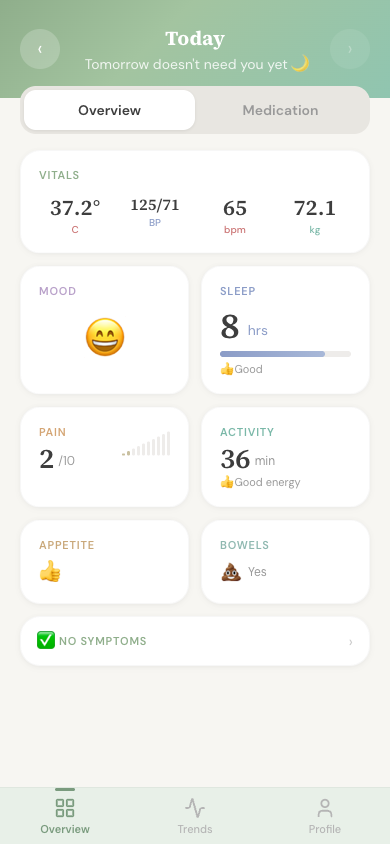
The main screen shows tiles for each thing you can log — like vitals, mood, pain, and sleep. At the bottom, there are three tabs:
- Overview — your daily log. This is where you'll spend most of your time. You can also switch to Medication view from here.
- Trends — charts showing how things are changing over time. You can also create reports here to share with your medical team.
- Profile — your name, transplant milestone, and links to food safety, clinic appointments, and settings.
What to do next
There's no right or wrong way to use Transplant Log. Here are some things you might want to try: